How to Handle Long-Running Functions in Your Workflow
When your workflow needs to interact with operations that take a significant amount of time to complete, you should decouple them from your workflow execution. This guide demonstrates how to use webhooks and asynchronous callbacks to handle long-running operations effectively.
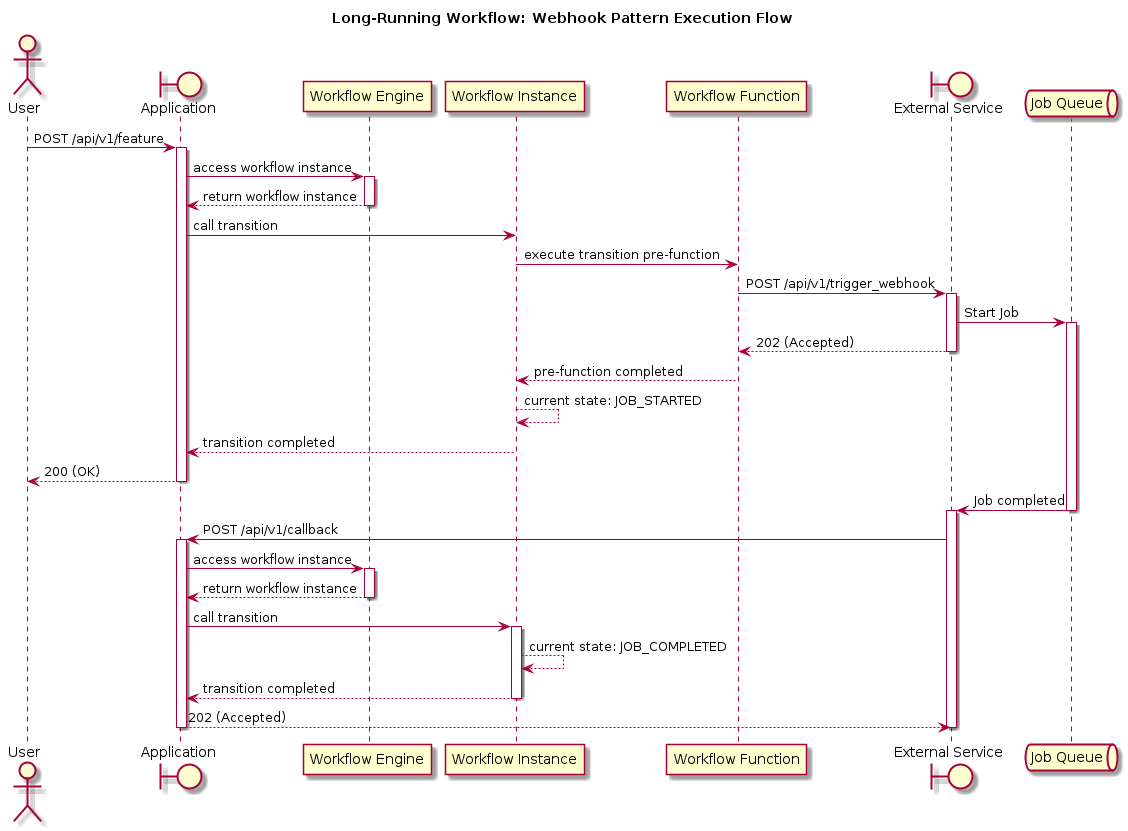
The approach works by having the workflow initiate the process through a transition and then enter a waiting state. Once the external process completes, your application receives a notification (webhook callback) about the job completion, allowing the workflow to continue.
|
This guide demonstrates the core pattern for handling long-running operations with webhooks. For simplicity, the examples do not include webhook security measures such as request signing, authentication tokens, or signature verification. In production, you must implement proper security measures to verify that callbacks are legitimate and prevent unauthorized access to your workflows. Security recommendations are provided in the Handle the Callback section below. |
Why Decouple Long-Running Operations?
Workflows are designed to orchestrate business processes efficiently, but they should not block execution waiting for operations that may take minutes, hours, or even days to complete. Synchronous execution of long-running operations within workflow functions creates several problems:
-
Resource Blocking: Threads and connections remain occupied while waiting for external services, limiting system throughput and scalability.
-
Timeout Issues: HTTP requests and database connections have timeout limits that may be exceeded by long-running operations.
-
Failure Recovery: If a synchronous operation fails after a long execution time, the entire workflow context may be lost, requiring expensive restarts.
-
Poor User Experience: Users are forced to wait for responses, leading to timeouts, connection drops, and a degraded experience.
-
Scalability Constraints: Systems cannot efficiently handle concurrent long-running operations when resources are tied up in blocking calls.
By decoupling long-running operations using webhooks and asynchronous callbacks, you achieve:
-
Non-Blocking Execution: Workflow transitions complete immediately, allowing the workflow engine to handle other instances without waiting.
-
Better Resource Utilization: Threads and connections are freed up quickly, enabling higher concurrency and better system performance.
-
Improved Reliability: Workflow state is persisted in a waiting state, making it resilient to system restarts and failures.
-
Enhanced Scalability: The system can handle many concurrent long-running operations without resource exhaustion.
-
Better User Experience: Users receive immediate acknowledgment while operations proceed in the background.
Common Use Cases
This pattern is particularly useful for:
-
External API Integrations: Calling third-party services that process requests asynchronously (e.g., payment processors, document generation services).
-
Batch Processing: Triggering large data processing jobs that run in separate systems or queues.
-
File Processing: Initiating operations that process large files, generate reports, or perform complex transformations.
-
Notification Services: Sending emails, SMS, or push notifications that may take time to deliver.
-
Workflow Orchestration: Coordinating with other workflow systems or microservices that operate independently.
Sequence Diagram
Add Webhook-Calling Custom Workflow Function
The webhook function serves as a bridge between your workflow and external services. It’s implemented as a pre-function, which means it executes before the transition completes, ensuring the external service is triggered while the workflow is still in a known state.
public class CallWebhookFunction implements WorkflowInstanceFunction {

  private static final Logger log = LoggerFactory.getLogger(CallWebhookFunction.class);

  public static final String CALLBACK_URL = "callback_url";
  public static final String WEBHOOK_URL = "webhook_url";
  public static final String CALL_WEBHOOK_FUNCTION_ALIAS = "webhook";

  @Override
  public void execute(
      WorkflowExecutionContext context,
      FunctionContext functionContext,
      Function function,
      Attributes args) {

    var callbackUrl = context.getInputs().getString(CALLBACK_URL).orElseThrow(); (1)
    var webhookUrl = context.getInputs().getString(WEBHOOK_URL).orElseThrow(); (2)
    var payload = String.format("{\"callback_url\": \"%s\"}", callbackUrl);
    log.info("Calling webhook to start job...");
    callWebhook(webhookUrl, payload); (3)
  }

  private static void callWebhook(String webhookUrl, String payload) {
    try (var httpClient = HttpClient.newHttpClient()) {
      httpClient.send(
          HttpRequest.newBuilder()
              .uri(URI.create(webhookUrl))
              .POST(HttpRequest.BodyPublishers.ofString(payload))
              .header("Content-Type", "application/json")
              .build(),
          HttpResponse.BodyHandlers.ofString());
    } catch (Exception e) {
      throw new WorkflowRuntimeException(e);
    }
  }

  @Override
  public ExtensionRegistration getRegistration() {
    return ExtensionRegistration.alias(CALL_WEBHOOK_FUNCTION_ALIAS); (4)
  }
}| 1 | The callback URL is embedded in the webhook payload, allowing the external service to notify your application when work completes. This design enables loose coupling—your workflow doesn’t need to know how the external service operates, only where to send the request and where to receive the callback. |
| 2 | The webhook URL is provided as input, making the function reusable across different external services. This flexibility is important when integrating with multiple third-party providers. |
| 3 | The HTTP call is intentionally synchronous but should return quickly. The external service should acknowledge receipt (HTTP 202) and process the job asynchronously. If the call fails, the workflow remains in its current state, allowing for retry logic or manual intervention. |
| 4 | Function registration with an alias allows the workflow definition to reference the function declaratively, keeping business logic separate from implementation details. |
Design Considerations
-
Fail-Fast Principle: Using
orElseThrow()ensures missing inputs cause immediate failure rather than silent errors later. This makes debugging easier and prevents workflows from getting stuck in invalid states. -
Exception Handling Strategy: Wrapping exceptions in
WorkflowRuntimeExceptionensures the workflow engine can properly handle failures. Consider adding retry logic or dead-letter queues for transient failures in production. -
Stateless Design: The function is stateless and retrieves all necessary data from the execution context. This makes it thread-safe and easier to test.
-
Timeout Configuration: In production, configure appropriate HTTP timeouts. The external service should respond quickly (within seconds), not after the job completes.
-
Security: Consider adding request signing, authentication tokens, or other security measures when calling external services. Never expose sensitive credentials in the workflow inputs.
Create a Workflow with Webhook Call
The workflow design follows a clear separation of concerns: initialization, waiting, and completion.
The job_started state acts as a persistent waiting state, allowing the workflow to survive system restarts while the external service processes the job.
workflow:
  id: "long_running_workflow"
  initial-transitions:
    - id: "init"
      default-result:
        state: "workflow_initialized"
  states:
    - id: "workflow_initialized"
      transitions:
        - id: "start"
          pre-functions:
            - alias: "webhook" (1)
          default-result:
            state: "job_started"
    - id: "job_started"
      transitions:
        - id: "job_complete"
          default-result:
            state: "job_done"
- id: "job_done"| 1 | Pre-functions execute atomically with the transition. If the webhook call fails, the transition doesn’t complete, and the workflow remains in workflow_initialized. This ensures consistency—either the external service is notified and the workflow moves to the waiting state, or nothing happens. |
State Design Patterns
-
Explicit Waiting States: The
job_startedstate is intentionally named to indicate the workflow is waiting. This makes monitoring and debugging easier—you can query for all instances in this state to see pending operations. -
Idempotent Transitions: The
job_completetransition can be safely called multiple times if the callback is retried. Consider adding guards or idempotency checks if your use case requires it. -
State Persistence: All states are persisted, so workflows can be resumed after system restarts. The waiting state ensures no work is lost if the system goes down.
-
Minimal State Machine: This example uses three states, but real-world workflows might need additional states for error handling, retries, or partial completion scenarios.
Trigger the Workflow Transition
The transition inputs serve as configuration for the webhook function, making the workflow flexible and reusable. The callback URL design is critical—it must encode enough context to identify the workflow instance when the external service calls back.
var inputs =
    mutableAttributes()
        .withString(WEBHOOK_URL, webhookUrl)
        .withString(CALLBACK_URL, callbackUrl); (1)
workflowEngine.instances().get(workflowInstanceId).transition(START_JOB, inputs);| 1 | Inputs are passed as attributes, which are then available to all functions in the transition. This pattern allows you to pass configuration data without hardcoding it in the workflow definition, making workflows more flexible and testable. |
Callback URL Design Patterns
-
Query Parameters: Embedding the workflow instance ID as a query parameter (e.g.,
?workflowInstanceId=123) is simple but exposes internal identifiers. Consider using opaque tokens instead for better security. -
Path Parameters: Including the identifier in the URL path (e.g.,
/callback/123) is more RESTful but requires URL routing logic. -
Signed Tokens: For better security, encode the workflow instance ID in a signed JWT or similar token. This prevents tampering and allows you to include expiration times.
-
Database Lookup: Store a mapping between callback tokens and workflow instances in a database. This allows you to rotate tokens and add additional metadata.
Production Considerations
-
Security: Never expose workflow instance IDs directly in URLs if they’re predictable or sensitive. Use opaque tokens, add authentication, and always use HTTPS.
-
URL Stability: Ensure callback URLs remain valid for the duration of the long-running operation. Consider using stable endpoints with token-based routing rather than instance-specific URLs.
-
Error Handling: Design your callback URL to handle retries gracefully. External services may retry callbacks, so ensure your handler is idempotent.
-
Monitoring: Include correlation IDs or other metadata in the callback URL to help trace requests across systems.
Handle the Callback
The callback handler is the entry point that resumes your workflow after the external service completes. It must be robust, secure, and idempotent, as external services may retry callbacks or send duplicate notifications.
log.info("callback received: {}", body);
var workflowInstanceIdValue = request.queryParam(routing.getCallbackQueryParamName());
var workflowInstanceId = WorkflowInstanceId.workflowInstanceId(workflowInstanceIdValue);
workflowEngine.instances().get(workflowInstanceId).transition(JOB_COMPLETE);
Callback Handler Best Practices
-
Idempotency: The callback handler should be idempotent. If the workflow is already in the
job_donestate, calling the transition again should be safe. Consider checking the current state before transitioning, or design your workflow to handle duplicate transitions gracefully. -
Authentication & Authorization: Verify the callback is legitimate. Use request signing (e.g., HMAC), verify API keys, or validate JWT tokens. Never trust callbacks without verification.
-
Error Handling: If the workflow instance doesn’t exist or is in an unexpected state, log the error and return an appropriate HTTP status. Don’t throw exceptions that might cause the external service to retry unnecessarily.
-
Async Processing: Consider processing callbacks asynchronously (e.g., via a message queue) to avoid blocking the HTTP handler and improve reliability.
-
Validation: Validate the callback payload before transitioning. Ensure required data is present and in the expected format. Reject malformed requests early.
-
Logging & Observability: Log all callback attempts with correlation IDs, workflow instance IDs, and timestamps. This helps debug issues and monitor system health.
-
Timeout Handling: External services may call back after your system has timed out the operation. Design your workflow to handle late callbacks appropriately—either accept them or reject them with clear error messages.